Website annotation tool
Pin visual website feedback to the exact place it belongs
Turn ‘the page feels confusing’ into evidence someone can review. Snap Site captures the rendered website, anchors findings to the relevant pixels, and gives every note enough structure to survive a real triage conversation.
Dated page captures · Pinned findings · Severity and category · Shareable review artifact

What you get
Feedback gets useful when it can answer where, why, and what next
A detached comment makes every reader reconstruct the page state and search for the element. A pinned annotation removes that ambiguity, while severity, category, evidence, and a recommended direction turn the note into a decision-ready review item.
Pins on exact elements
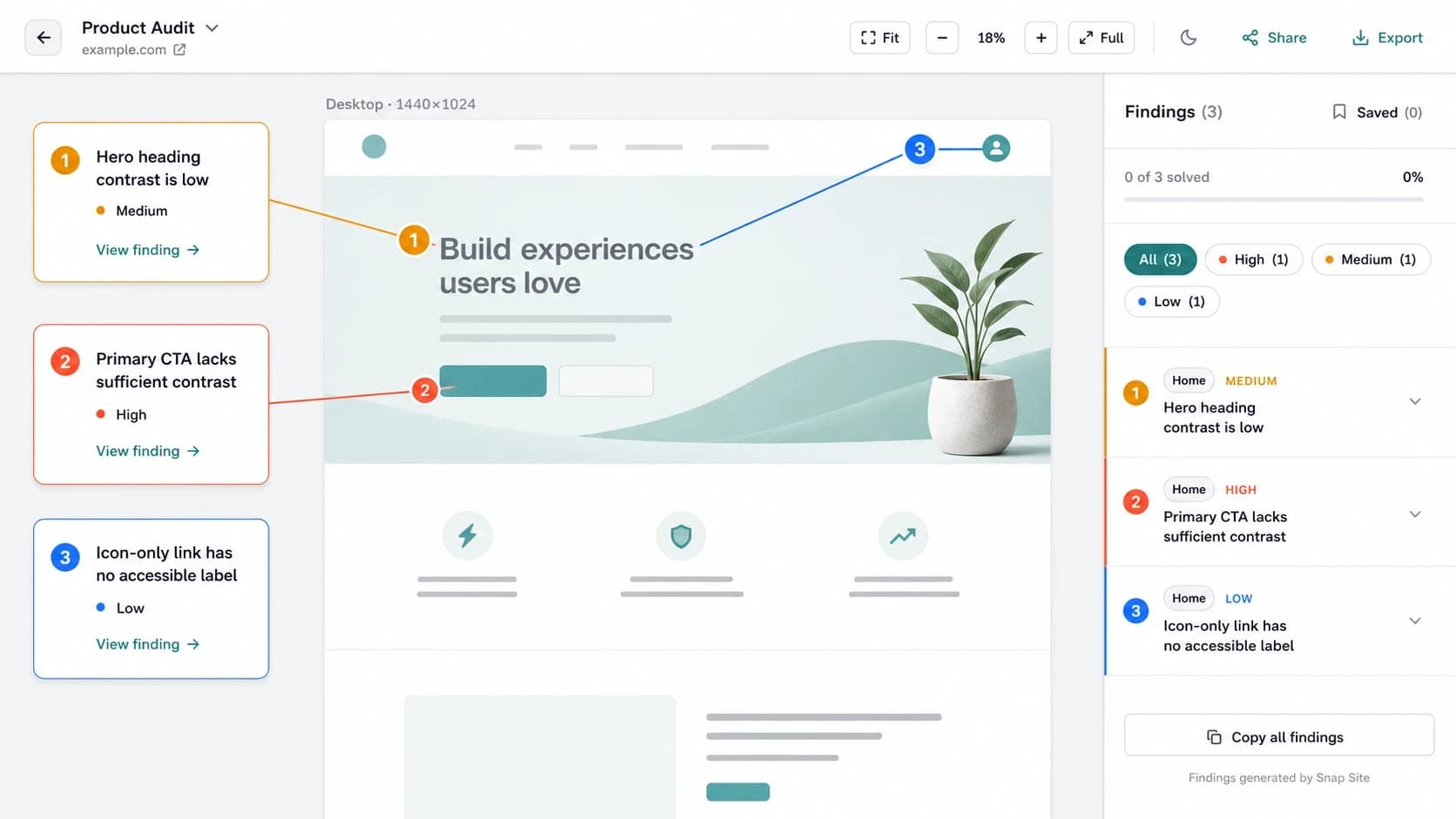
Each finding points to a location on a dated page capture, so the reviewer can see the same state and element the observation describes.
Structured visual feedback
Keep the pattern, evidence, severity, category, and recommended direction together instead of scattering context across comments and screenshots.
Responsive context
Attach observations to desktop or mobile evidence so the team knows which layout, viewport, overlay, or content order created the problem.
A shared review artifact
Inspect, edit, resolve, share, or export findings from the same captured source of truth rather than debating different versions of the live page.
Visual annotations
Put the note on the evidence, not somewhere near the project
Location-based feedback is expensive to read. ‘The cards near the bottom’ forces every person to find the section before they can evaluate the point, and the reference becomes unreliable as soon as the live site changes. A pin on a dated capture answers where immediately and preserves what the reviewer actually saw.
Anchoring also improves the note itself. A broad reaction such as ‘the page is cluttered’ has nowhere precise to attach. The reviewer must identify the competing actions, dense card group, or overlapping banner that creates the reaction. That movement from mood to evidence is what makes website annotations actionable.
What a finding needs
Pattern, evidence, weight, and a direction
Name the pattern in language the team can reuse: weak contrast, hidden primary action, inconsistent terminology, missing system status, or cramped touch targets. Point to the exact element and state that supports it. Give it an honest severity so a launch blocker does not compete with optional polish. Then state a direction without pretending the first suggestion is the final design.
Snap Site uses categories and high, medium, or low severity to turn a long review into a queue. The AI-assisted pass can draft this structure, but the reviewer should edit, reject, merge, and add findings. A quality bar matters more than volume; forty weak notes are less useful than six findings the team trusts.
- Name the principle or recurring UX pattern
- Anchor the observation to a visible element and captured state
- Assign severity according to user and task impact
- Recommend a direction and leave the final solution to the team
Collaboration
Give product, design, marketing, and engineering one source of truth
Different disciplines will interpret the same evidence differently, and that is useful. Marketing may see a buried CTA as lost intent, design may see a hierarchy problem, and engineering may see a shared component defect. A pinned finding lets them disagree about impact or remedy while still agreeing on the page state being discussed.
Use the audit in a short triage: confirm the evidence, choose an owner, decide whether the item ships now, enters research, becomes an experiment, or is consciously declined. Marking findings solved on the same artifact leaves a record of what changed rather than letting the decision disappear into a chat thread.
Website feedback boundaries
A screenshot can preserve evidence without proving behavior
A capture can show that content is clipped, a button is visually obscured, labels are inconsistent, or the mobile order weakens the page's argument. It cannot prove that visitors fail the task, explain why they abandon, or reveal an interaction state that was never captured. Available HTML can strengthen some findings but does not remove the need for hands-on testing.
Use annotations to make observations falsifiable and easy to inspect. Then bring in analytics, support themes, user research, keyboard and screen-reader testing, and product constraints when the decision requires them. The tool organizes evidence; the team remains responsible for the conclusion.
Example output
From a vague comment to a finding the team can triage
This real Snap Site annotation view keeps each note connected to the page. The representative examples below show the level of specificity that makes visual feedback useful.
Primary action has no visible completion feedback
Evidence: The captured form presents a submit control without an adjacent loading, success, or error state.
Next step: Verify the live interaction and provide an inline status that remains available to keyboard and assistive-technology users.
The same destination uses competing labels
Evidence: Navigation, heading, and supporting links name one contact flow in different ways.
Next step: Choose the label closest to the user's goal and apply it through the shared navigation source.
Secondary labels may fade into the surface
Evidence: Small gray text appears close to the background color in the captured state.
Next step: Measure the real color tokens and strengthen contrast where the result falls short.
Annotations are strong evidence for
- The exact visible element, viewport, and dated page state
- Clear hierarchy, label, form, navigation, and layout observations
- Prioritized cross-functional review and ownership decisions
Annotations cannot establish
- How often the problem occurs or its actual conversion impact
- Behavior in private, dynamic, or uncaptured states
- Complete accessibility conformance or representative user response
Questions, answered
Website annotation tool FAQ
What is a website annotation tool?
A website annotation tool lets a reviewer attach feedback to specific elements or locations on a captured page. Snap Site adds structure around each pin with severity, category, evidence, and a recommended direction so the observation is easier to verify and triage.
Can I annotate both desktop and mobile websites?
Yes. Capture desktop, mobile, or both and keep findings associated with the relevant page and screen size. This makes responsive observations specific instead of treating mobile as a smaller copy of the desktop review.
Can my team share and resolve the annotations?
Snap Site audits can be reviewed and shared as a common artifact. Findings can be inspected and managed in the workspace so product, design, marketing, and engineering can discuss the same captured evidence.
Does Snap Site automatically generate website feedback?
It can generate an AI-assisted first pass using usability, accessibility, hierarchy, content, and responsive lenses. The output is a draft: a human reviewer should confirm the evidence, adjust severity, reject weak observations, and add product context.
Can an annotation prove that a UX issue affects conversion?
No. It can document a plausible source of friction and the visible evidence behind it. Analytics, experiments, research, and customer behavior are needed to establish frequency, cause, and business impact.
Start with a real page
Give your next website review a shared source of truth.
Capture the page, keep findings attached to the evidence, and turn scattered visual feedback into a prioritized review your team can inspect, edit, and resolve.
“Pinning issues to the actual spot on the page is way more useful than a generic checklist report.”