UX audit tool
AI-powered UX audit tool for clearer website reviews
Turn a public URL into a structured first-pass UX review. Snap Site captures the real page, evaluates visible friction against established usability principles, and pins every finding to the evidence your team needs to discuss it.
5 free credits every month · No card required · Human review stays in control
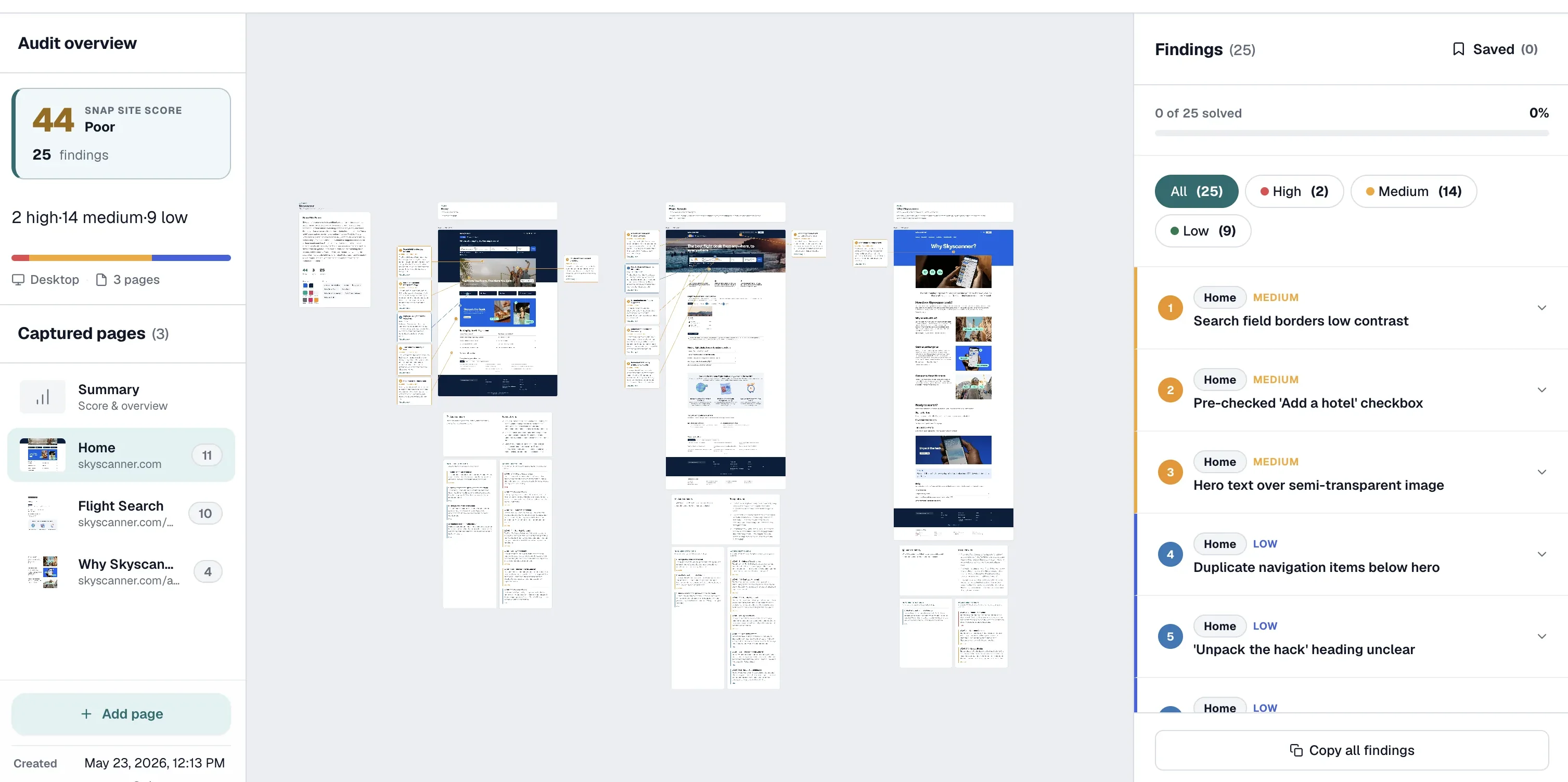
What you get
A review artifact, not a generic score
A useful UX audit should show what is wrong, where it happens, why it matters, and how urgent it is. Snap Site keeps those four pieces together on the captured page so a finding can move from observation to decision without losing context.
Evidence pinned to the page
Each finding points to the exact visible element on a dated capture, so the team reviews the same state instead of reconstructing it from a vague comment.
Recognized UX lenses
The first pass uses Nielsen Norman Group's ten usability heuristics, selected WCAG 2.2 A/AA checks, and evidence-gated UX best practices.
Responsive comparison
Capture desktop, mobile, or both. Compare hierarchy, navigation, forms, calls to action, and layout behavior at the screen sizes visitors actually use.
Prioritized findings
High, medium, and low severity labels turn a long critique into a queue the team can triage, edit, resolve, share, or carry into Figma.
What it checks
A broad first pass across usability, clarity, and accessibility
Snap Site looks beyond visual polish. It checks whether the page communicates its purpose, makes the next action obvious, uses consistent labels, prevents avoidable mistakes, and gives visitors enough feedback to understand what is happening. It also examines visible hierarchy, form structure, trust signals, responsive layout, and accessibility cues that can create friction before a user completes the page's main task.
The review is evidence-gated. A finding must connect to a specific element or state that appears in the captured page. That keeps the output grounded in what a visitor can actually encounter instead of filling the report with generic advice that could apply to any website.
- Nielsen Norman Group's ten usability heuristics
- Visual hierarchy, content clarity, navigation, forms, and conversion cues
- Selected WCAG 2.2 A/AA checks supported by visual, content, HTML, or interaction evidence
- Desktop and mobile reflow, target size, clipping, overlap, and hidden-action risks
Workflow
From URL to prioritized findings in three steps
First, paste the public page you want to review and choose desktop, mobile, or both. If a useful state is behind a menu, cookie banner, pricing toggle, or other public interaction, add a short plain-language instruction before the capture starts.
Second, Snap Site captures the rendered page and creates a first-pass review. Findings land beside the screen with a severity, category, explanation, and precise visual anchor. Failed or blocked captures are identified as capture problems instead of being misreported as UX problems.
Third, apply your context. Edit or reject findings, add what only your team knows, share the audit, export a report, or bring the capture and annotations into the Figma plugin. The AI expands coverage; the human reviewer decides what is true and what ships.
Who it helps
Built for the moment between noticing friction and fixing it
Designers can use the audit as a heuristic-review starting point, with evidence already organized for critique. Product managers can turn visible problems into a prioritized conversation about impact and ownership. Researchers can use it to form hypotheses before moderated testing, not as a replacement for observing real users. Founders can get a structured read before a launch without pretending that one automated score settles every design decision.
Because the artifact is a captured page rather than a detached checklist, product, design, marketing, and engineering can point to the same evidence. That makes disagreements more specific: the team can debate severity or context instead of debating which version of the page someone saw.
AI and human judgment
Use AI for coverage; keep people responsible for the conclusion
AI is good at applying the same checklist patiently across a long page and spotting repeated patterns that a rushed reviewer may skip. It does not know your roadmap, audience research, business constraints, or whether a deliberate trade-off is working. That is why Snap Site labels the result as a first pass and keeps every finding editable.
A strong workflow is to let the tool surface candidates, then have a product or design owner confirm the evidence, adjust severity, combine duplicates, and decide whether the next step is a design change, an experiment, a user test, or no action. The output becomes useful when context meets coverage.
Compared with a manual review
Faster preparation, not a substitute for user research
A manual expert review can go deeper into domain context, multi-step journeys, unusual interaction states, and trade-offs that are invisible from one captured page. It also takes time to prepare screenshots, document evidence, name principles, and format the result. Snap Site automates much of that preparation so an expert can spend more time judging the findings.
For high-stakes workflows, pair the first pass with manual keyboard and screen-reader testing, analytics, customer support themes, and sessions with representative users. A heuristic review tells you where friction is plausible. Real behavior tells you how often it happens and what people do next.
Example output
What a useful UX finding looks like
The screenshot is product evidence; the three cards are representative examples of the structured observations Snap Site produces. Each finding keeps the visible evidence and the next review step together so a person can accept, edit, or reject it.
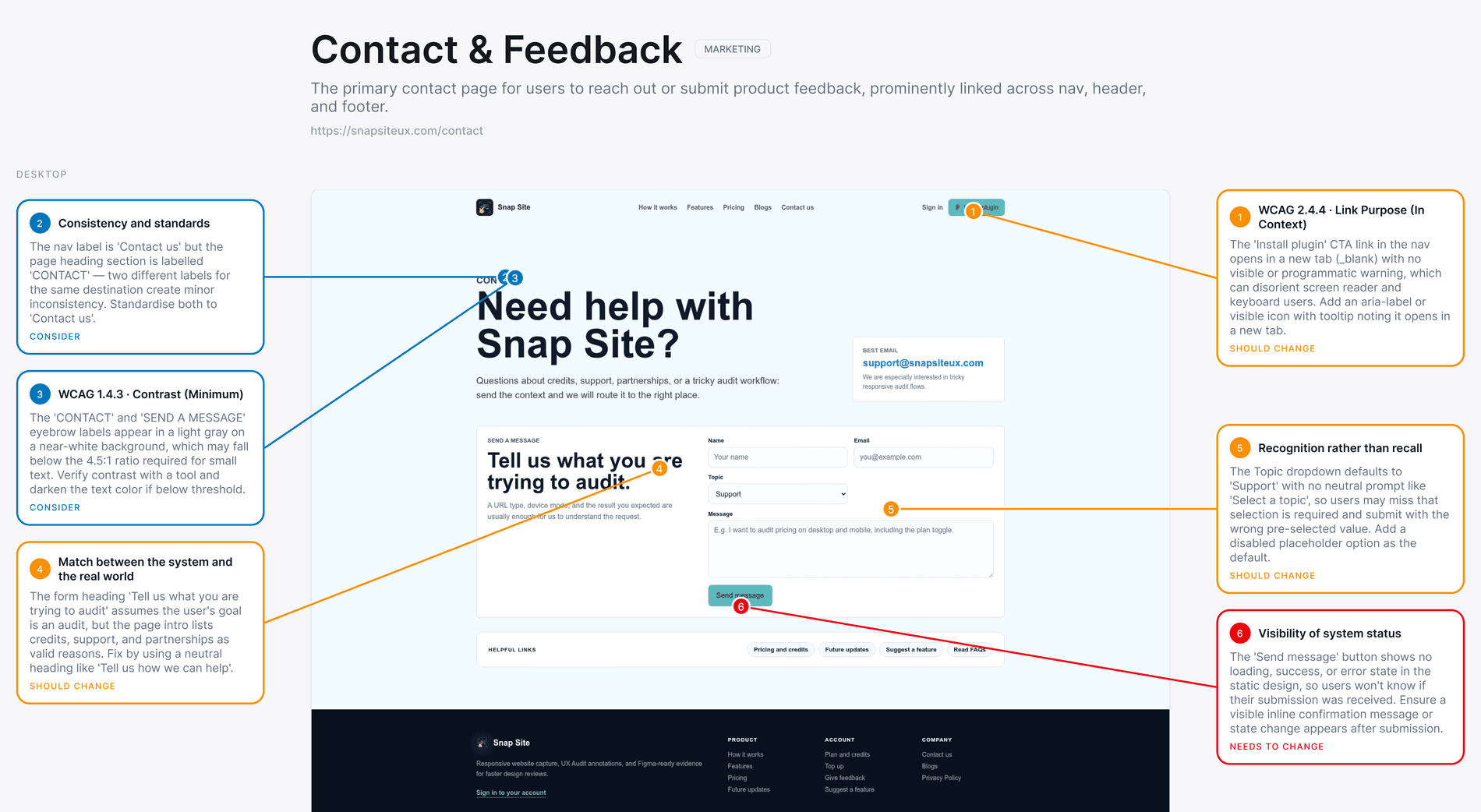
Submission gives no visible status
Evidence: The primary form action has no visible loading, success, or error state in the captured interface.
Next step: Confirm the live interaction, then add an inline status message and a clear recovery path.
Two labels describe the same destination
Evidence: The navigation and page heading use different terms for the contact experience.
Next step: Choose one user-facing term and apply it consistently across entry points.
Supporting text is visually subdued
Evidence: Small gray labels sit on a near-white background and may be easy to miss.
Next step: Measure the actual colors, then strengthen the token if contrast is below the intended threshold.
Good first-pass signals
- Visible hierarchy, label, navigation, form, and responsive-layout friction
- Repeated patterns that can be compared across captured pages
- Candidate accessibility issues supported by visual or available HTML evidence
Still needs human evidence
- Whether the issue materially affects this audience or business goal
- Private, authenticated, or uncaptured interaction states
- Representative user behavior and full assistive-technology testing
Questions, answered
UX audit tool FAQ
What is a UX audit tool?
A UX audit tool helps reviewers examine an interface for usability problems and organize the evidence. Snap Site captures the page, checks it against recognized heuristics and evidence-gated best practices, and pins each finding to the relevant element so the result is easier to verify and discuss.
Does Snap Site replace a UX designer or researcher?
No. It creates a structured first pass and removes repetitive capture and documentation work. A designer, researcher, product owner, or founder still needs to confirm the evidence, apply context, and decide what action is appropriate.
Can I compare desktop and mobile UX?
Yes. Choose desktop, mobile, or both when configuring the audit. Each page and screen size uses one credit, and the resulting captures can be reviewed side by side in the same workspace.
Which usability principles does the audit use?
The first pass includes Nielsen Norman Group's ten usability heuristics, selected WCAG 2.2 A/AA checks, and curated UX best practices for hierarchy, content, forms, navigation, conversion cues, and responsive behavior.
Can I use the results in Figma?
Yes. Snap Site has an optional Figma plugin. The web app and plugin share the same account, credit pool, and audit history, so you can review in the browser and bring captures into the design canvas when needed.
Start with a real page
See the page your visitors actually see.
Paste a public URL, choose a screen size, and turn the result into a prioritized review your team can inspect, edit, and share.
“It showed me exactly where the problems were and explained why they mattered. It caught things I had completely overlooked.”