Website audit tool
Website audit tool for UX and accessibility — not another SEO crawler
Most website audit tools inspect technical SEO or performance. Snap Site reviews the rendered experience: whether people can understand the page, find the next action, use it across screen sizes, and move forward without avoidable friction.
UX and accessibility review · Desktop and mobile captures · Optional Figma workflow
What you get
Audit the experience behind the URL
Technical health matters, but a crawl report cannot show that a button disappears into the design, a form feels impossible on mobile, or the page never explains why a visitor should care. Snap Site captures the page and reviews those human-facing signals directly.
Rendered page evidence
Review the actual page state, including responsive layout, visible content, banners, controls, images, and other conditions a static SEO report may miss.
UX and accessibility lenses
Combine usability heuristics, selected WCAG 2.2 checks, visual hierarchy, content clarity, navigation, forms, and conversion best practices.
Multi-page audits
Capture the homepage and relevant public subpages so the review can compare patterns, labels, navigation, and repeated component problems across the site.
A team-ready output
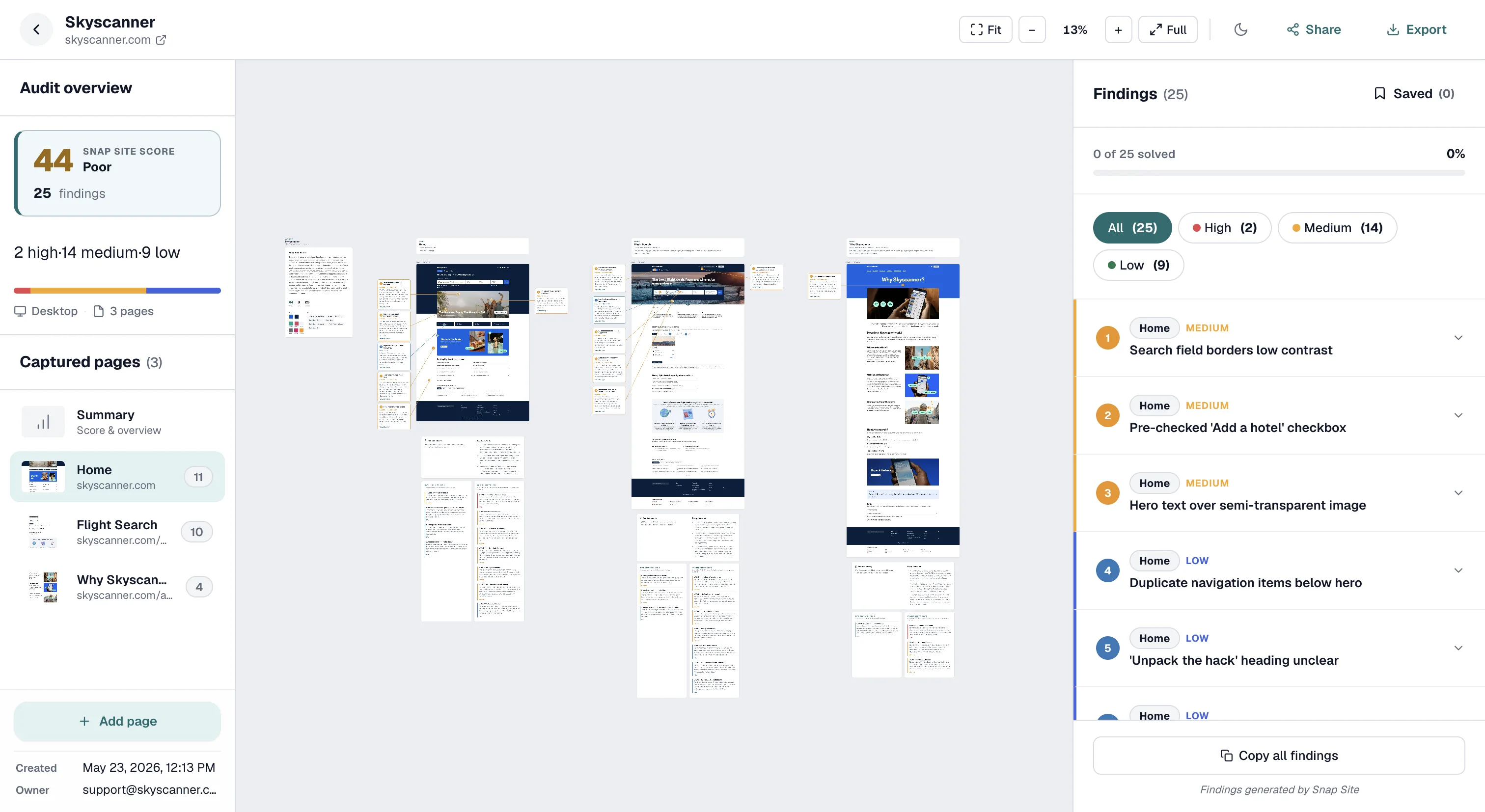
Use pinned annotations, severities, categories, sharing, PDF export, and the optional Figma plugin to turn observations into reviewable work.
The difference
Technical website audits and UX website audits answer different questions
An SEO audit asks whether search engines can discover, interpret, and rank the site. A performance audit measures loading and runtime behavior. A security audit looks for vulnerabilities. Those are all important, but they do not answer whether a first-time visitor understands the offer, trusts the page, notices the primary action, or can complete a form on a phone.
Snap Site is designed for that experience layer. It reviews what is visible and, where available, supporting content, HTML, and interaction evidence. Use it alongside search, performance, security, and analytics tools rather than treating one report as a complete definition of website quality.
What it examines
Usability, accessibility, hierarchy, content, and responsive behavior
The first pass applies Nielsen Norman Group's ten usability heuristics to concrete elements on each captured page. It checks selected WCAG 2.2 A/AA criteria when the evidence supports a responsible finding. A separate set of UX best practices covers topics such as value proposition clarity, visual hierarchy, form effort, trust placement, navigation, content readability, and useful empty states.
The tool also compares the rendered layout at the screen sizes you choose. Mobile-specific problems often come from the combination of otherwise valid components: a sticky banner plus a keyboard plus a small viewport, or a card stack that separates the action from the proof that supports it. Full-page captures preserve those relationships.
- Purpose, labels, feedback, consistency, error prevention, and user control
- Headings, links, forms, contrast cues, target size, reading sequence, and reflow
- Primary-action hierarchy, value proposition, trust, copy, navigation, and form effort
- Desktop and mobile differences, clipping, overlap, stacking, and hidden content
Scope
Choose the pages that represent the real journey
A homepage-only audit is useful for first impressions, but many important problems live deeper in the journey. Include the pricing page when plan choice matters, the lead form when acquisition matters, and the relevant product or service pages when visitors need to compare options. A smaller set of purposeful pages produces a more actionable report than crawling every public URL without a question in mind.
Snap Site can discover and capture multiple public pages in one run, within the limits of the selected plan. You can also specify a page directly, audit one screen size or two, and add a public interaction instruction when the review needs a particular state.
For different teams
One captured source of truth, several useful decisions
Design teams can use the annotations for heuristic critique and responsive review. Product teams can sort findings by severity and decide which ones need fixes, research, or acceptance. Marketing teams can focus on message clarity, action visibility, trust, and campaign landing pages. Founders can review a launch surface before exposing it to more traffic.
The capture keeps these conversations aligned. Marketing may interpret a weak CTA as lost intent while design sees a hierarchy problem and engineering sees a component token. All three can still point to the same element and agree on the evidence before deciding on the remedy.
Repeat audits
Use dated captures to make website quality observable over time
A live website changes. Campaign banners appear, components are replaced, and mobile layouts drift as new sections are added. A dated audit gives the team a stable record of what was visible when the finding was made. Mark resolved items, retain decisions, and repeat the audit after a redesign or meaningful release.
The comparison is not a perfect automated regression test, but it is a useful review habit. Teams can see whether known friction disappeared, whether new content introduced hierarchy or accessibility problems, and whether the same component issue returned on another page.
Example output
A website review your team can inspect instead of just score
A multi-page audit keeps page context, severity, and visual evidence in one review artifact. These representative findings show how broad website observations become specific follow-up work.
Repeated form component blocks completion
Evidence: The same required control becomes unreachable behind a sticky element on two captured pages.
Next step: Fix the shared component, then verify every page and viewport where it appears.
Navigation labels drift across the site
Evidence: The same destination uses different names between the homepage, pricing page, and footer.
Next step: Choose a canonical label and update the shared navigation source.
Supporting headings skip a clear level
Evidence: The visible and available heading structure jumps around repeated card groups.
Next step: Inspect the DOM outline and correct the shared section component where necessary.
Experience-layer evidence
- Cross-page consistency, repeated components, and navigation patterns
- Rendered mobile and desktop conditions a crawler cannot describe visually
- UX, content, form, hierarchy, and selected accessibility candidates
Use complementary tools for
- Index coverage, keywords, backlinks, schema, and technical SEO
- Core Web Vitals, network performance, security, and code vulnerabilities
- Analytics, task success, and behavior from representative users
Questions, answered
Website audit tool FAQ
Is Snap Site an SEO audit tool?
No. It does not crawl the site to score keywords, backlinks, index coverage, or technical SEO. It audits the rendered user experience for usability, accessibility, visual hierarchy, content clarity, responsive behavior, and conversion friction.
Can it audit more than the homepage?
Yes. Depending on the plan and run configuration, Snap Site can capture multiple public pages and screen sizes. Choose the pages that represent the journey you want to review rather than treating every URL as equally important.
What does one credit cover?
One page captured at one screen size uses one credit. The same page on desktop and mobile uses two. AI-guided interaction adds five credits per run. Failed captures are automatically refunded according to the current product behavior.
Can the audit access a website behind a login?
URL audits run anonymously and cannot sign in with private credentials. If the state is not publicly reachable, use Upload image for a visual-only audit of a screenshot and verify interaction or HTML-dependent issues separately.
How often should I audit my website?
Run an audit before a major launch, after a meaningful redesign, when analytics or support data points to a specific problem, and periodically on high-value pages that change often. Repeat reviews are most useful when the team tracks which earlier findings were resolved or accepted.
Start with a real page
See the page your visitors actually see.
Paste a public URL, choose a screen size, and turn the result into a prioritized review your team can inspect, edit, and share.
“It showed me exactly where the problems were and explained why they mattered. It caught things I had completely overlooked.”