Landing page audit
AI landing page audit before your campaign goes live
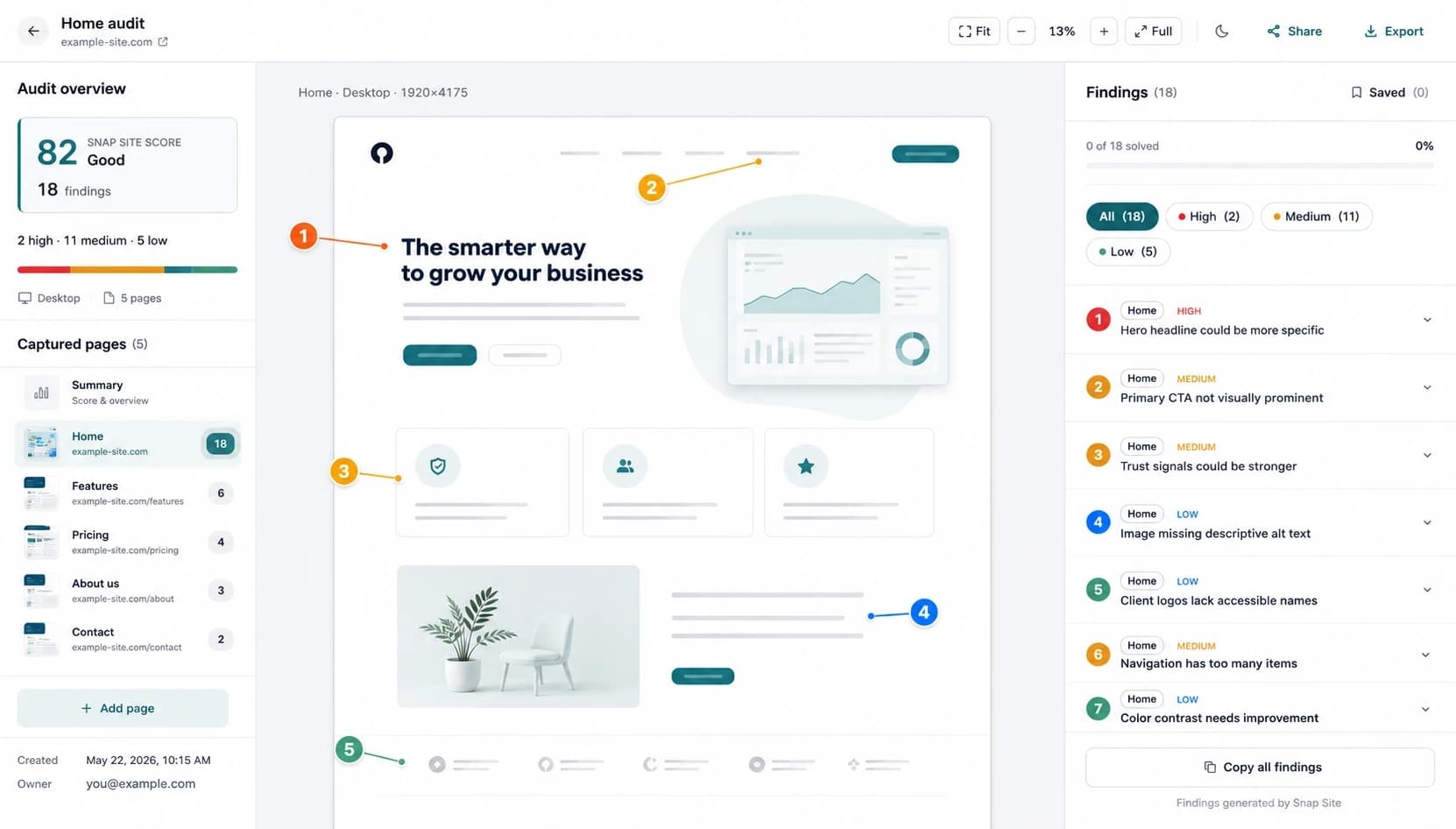
Catch conversion friction before paid traffic finds it. Snap Site reviews the rendered landing page for clarity, credibility, action visibility, responsive behavior, and accessibility, then pins the evidence to the screen.
Review desktop, mobile, or both · 5 free credits monthly · No card required
What you get
See whether the page earns the next click
A landing page can be polished and still make visitors work too hard to understand the offer, trust the claim, or find the next step. The audit turns those risks into concrete findings your marketing and product teams can review before launch.
Value proposition clarity
Check whether the first screen explains what the offer is, who it is for, why it matters, and what the visitor should do next.
CTA and form friction
Review action hierarchy, label clarity, field burden, instructions, and places where the conversion path becomes hard to predict or complete.
Trust near the decision
Find missing, distant, or weak credibility signals around the points where the page asks for attention, information, or money.
Mobile campaign readiness
Compare the mobile fold, stacking order, tap targets, overlays, forms, and content density with the desktop version before traffic arrives.
Before launch
Audit the exact page and state your campaign will send people to
Campaign performance depends on the experience after the ad click. Review the production or staging URL when possible, using the same message, offer, pricing state, and device sizes the audience will encounter. A beautiful design file cannot reveal a cookie banner covering the button, a slow embed leaving a hole above the fold, or a mobile stack that asks for an email before explaining the offer.
Snap Site captures the rendered page so the review includes those real conditions. If the relevant state requires opening a public menu, dismissing a banner, or changing a pricing toggle, describe the interaction in plain language before the run. The resulting audit preserves that state as evidence for the team.
What it checks
Clarity, confidence, and the path to action
The first pass examines whether the value proposition is specific, whether visual weight matches the intended action, and whether content is arranged in a sequence a new visitor can follow. It looks for competing calls to action, vague labels, long or poorly grouped forms, weak instructions, buried pricing, and trust signals that are missing or too far from the decision they are meant to support.
It also applies usability heuristics and selected WCAG checks. A conversion flow can fail because the primary button looks secondary, but it can also fail because its label is unclear, its contrast is weak, its target is cramped on mobile, or an overlay makes it unreachable. Reviewing these lenses together produces a more realistic picture than a style critique alone.
- Headline and first-screen specificity
- Primary versus secondary action hierarchy
- Form length, labels, grouping, defaults, and error guidance
- Social proof and trust placement near high-friction decisions
- Mobile reflow, stacking order, overlays, target size, and content density
Triage
Separate launch blockers from experiments and polish
Not every finding should delay a campaign. Start with problems that can prevent the main task: a hidden or broken action, missing essential information, a form that cannot be completed, or content that becomes unusable on the target device. Resolve those before traffic arrives.
Next, review medium-severity friction that may reduce confidence or comprehension: inconsistent labels, weak comparison, unclear supporting copy, or trust evidence placed too late. These may become pre-launch fixes or controlled experiments. Keep minor polish separate so it does not crowd out the problems most likely to affect the campaign goal.
Mobile traffic
Do not assume responsive means persuasive
A page can technically fit a phone while losing the argument it made on desktop. Headlines wrap into a wall, supporting proof moves several screens away, side-by-side comparisons become long card stacks, and the primary action falls below a promotional bar. The mobile audit captures what survives those trade-offs.
Compare the order of information, the visibility of the primary action, the usefulness of product images at a narrow width, and the effort required to complete the form with a thumb and an on-screen keyboard. If most campaign clicks are mobile, review that capture first rather than treating it as a smaller copy of the desktop page.
Measurement
Use the audit to improve the test plan, not replace analytics
The audit identifies plausible sources of friction; it does not prove their conversion impact. Connect high-confidence findings to the funnel metric they could affect, such as form starts, completion rate, CTA clicks, checkout progression, or qualified leads. After clear defects are fixed, use experiments where two reasonable approaches remain.
This separation matters. Accessibility failures, broken controls, and misleading labels should not need an A/B test to justify repair. Preference questions and message variants often do. Snap Site helps the team describe what it sees so analytics and experiments can answer the next question with more precision.
Example output
Three findings a pre-launch review can make actionable
The goal is not to manufacture a conversion score. It is to give the campaign team a concrete, inspectable list of launch risks, hypotheses, and follow-up checks.
Primary action is obscured on mobile
Evidence: The captured narrow layout places a persistent banner over the main call to action.
Next step: Fix the overlap and retest with the banner, keyboard, and target viewport active.
Pricing appears after the form asks for commitment
Evidence: Visitors are asked for contact details before the page explains the plan or expected cost.
Next step: Move decision-critical pricing context closer to the form and validate the change in funnel data.
Secondary actions compete with the campaign CTA
Evidence: Several buttons above the fold use similar visual weight and equally generic labels.
Next step: Give the campaign action one clear label and reduce emphasis on lower-priority paths.
Useful before traffic arrives
- Offer, headline, CTA, trust, form, and first-screen clarity risks
- Mobile stacking, overlays, cramped targets, and buried actions
- Visible defects that should be fixed before an experiment
Cannot predict on its own
- Traffic quality, offer-market fit, willingness to pay, or lead quality
- The actual conversion lift of a reasonable copy or layout alternative
- Downstream friction after the captured landing page
Questions, answered
Landing page audit FAQ
What should a landing page audit include?
It should examine the value proposition, first-screen clarity, action hierarchy, content sequence, trust signals, form effort, accessibility, and the responsive experience. It should also connect every recommendation to visible evidence and the page's primary goal.
Can I audit desktop and mobile together?
Yes. Choose both screen sizes in one run to compare the first fold, stacking order, navigation, calls to action, forms, overlays, and content density. Each page and screen size uses one credit.
Does Snap Site calculate a conversion score?
No single score can account for the offer, traffic quality, audience, and business context. Snap Site prioritizes evidence-based findings so your team can decide which issues are defects, which need research, and which are suitable for an experiment.
Can it review a staging landing page?
It can review a publicly reachable staging URL. URL audits run anonymously and cannot sign in with private credentials. For an inaccessible state, upload a screenshot for a visual-only review.
Should I run the audit before or after launch?
Both are useful. Run it before launch to catch obvious blockers and mobile problems, then repeat after meaningful page changes or when funnel data points to a specific step. Keep analytics as the source for actual conversion behavior.
Start with a real page
See the page your visitors actually see.
Paste a public URL, choose a screen size, and turn the result into a prioritized review your team can inspect, edit, and share.
“It showed me exactly where the problems were and explained why they mattered. It caught things I had completely overlooked.”