Accessibility audit tool
Visual accessibility audit for a faster WCAG first pass
Find accessibility risks that are visible in the rendered experience and connect each one to the relevant WCAG 2.2 A/AA criterion. Snap Site makes the first pass easier to review without pretending that a screenshot can certify compliance.
Visual + content + available HTML evidence · WCAG 2.2 A/AA first pass · Not a compliance certificate
What you get
Accessibility findings your team can point to
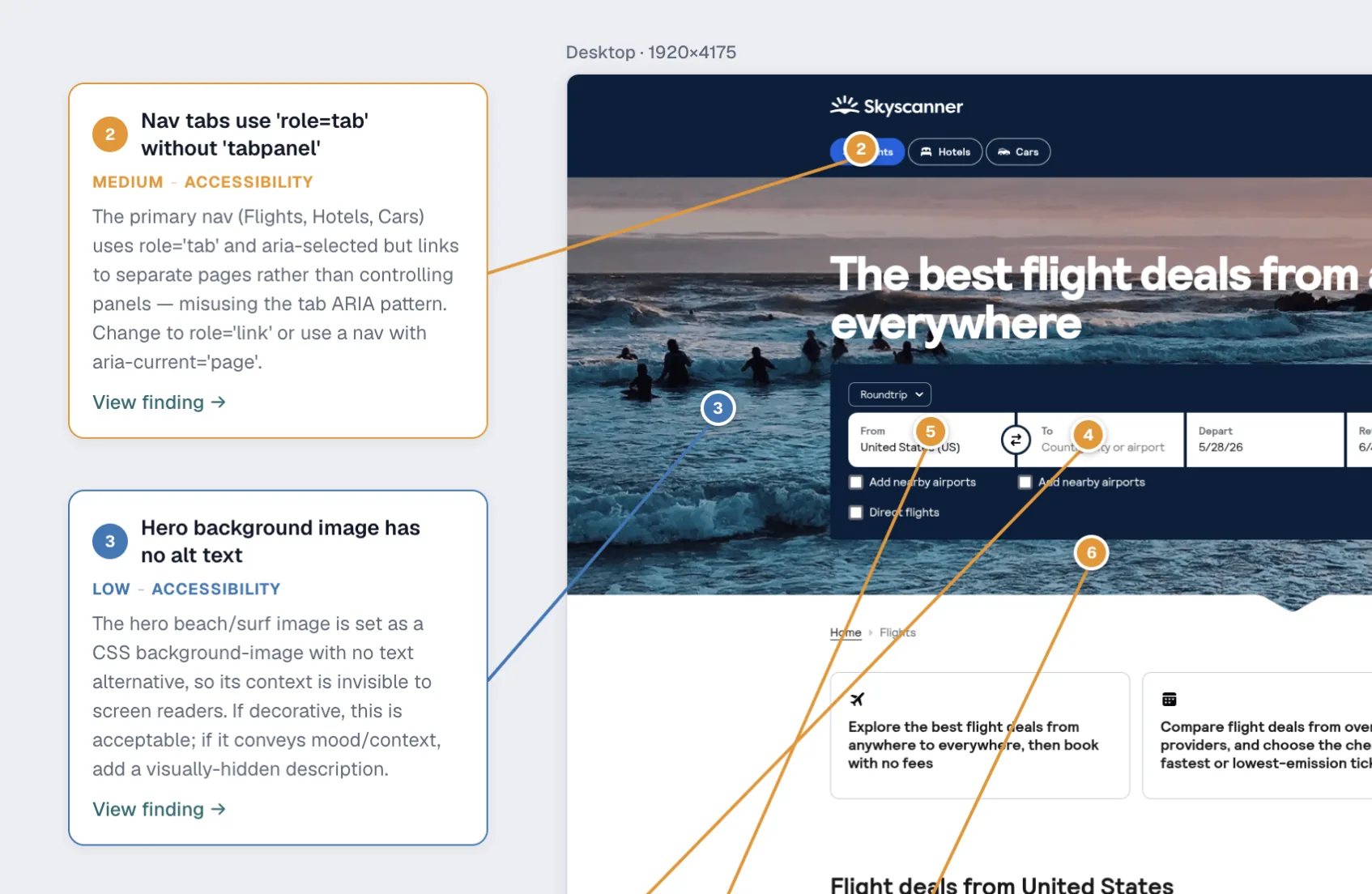
Accessibility work gets easier to act on when the issue, evidence, criterion, and recommended direction stay together. Snap Site places the finding on the capture and clearly separates what can be inferred from what still needs exact measurement or hands-on testing.
WCAG-linked findings
Issues are mapped to a curated set of WCAG 2.2 A/AA success criteria instead of being labeled with a vague accessibility score.
Multiple evidence sources
The review can use the visible page, extracted content, available HTML, and captured interactions, with caution rules for checks that need stronger proof.
Responsive evidence
Desktop and mobile captures reveal reflow, clipping, crowding, reading-order, and target-size risks in the layouts people actually encounter.
Honest boundaries
Exact contrast, keyboard behavior, screen-reader output, captions, timing, and complex states still require dedicated tools and manual verification.
Coverage
What the accessibility first pass can examine
The audit covers a curated group of high-signal checks from WCAG 2.2 Levels A and AA that can be supported by the evidence Snap Site captures. Examples include text alternatives and accessible names where HTML is available, semantic headings and labels, logical reading sequence, visible use of color, apparent text and non-text contrast, responsive reflow, descriptive links, form instructions, language declaration, and minimum target size.
Each rule carries an evidence requirement. A static screenshot can support a finding about visibly cramped controls or clipped mobile content. It cannot, by itself, prove that keyboard focus is missing or that a screen reader announces a control incorrectly. Those issues are only raised when the captured HTML or interaction evidence supports them.
- Perceivable: text alternatives, structure, sequence, color, contrast, reflow, and text spacing risks
- Operable: keyboard-support evidence, bypass blocks, page titles, link purpose, headings, focus cues, and target size
- Understandable: language, consistent identification, labels, and instructions
- Robust: available evidence for names, roles, and states on custom controls
Visual accessibility
Why the rendered page still matters when you already use a code scanner
Automated code scanners are essential, but some of the most obvious barriers are experienced visually: helper text that disappears against its background, a primary action that looks disabled, crowded icon buttons on mobile, text clipped by a fixed-height card, or a layout that forces sideways scrolling. Reviewing the rendered state shows how several otherwise valid components combine on the real page.
Snap Site complements scanners by keeping those visible problems attached to a full-page capture. That makes the evidence easier for designers, product managers, marketers, and engineers to understand together. It also helps teams compare the same component across screen sizes, where an issue may appear only after columns collapse or controls move closer together.
Workflow
Use the first pass to focus the manual audit
Start with the public page and the screen sizes that matter. Review the resulting accessibility category first, confirm that each pin points to the right element, and remove any observation that lacks sufficient evidence. Then group repeated component-level issues so one fix can address every instance.
Use the remaining findings to plan exact checks: measure contrast ratios, tab through the page, test zoom and text spacing, inspect names and roles in the accessibility tree, and run the core task with a screen reader. The automated pass does not eliminate this work; it gives the team a clearer map of where to begin and a visual artifact for tracking what changed.
Teams
Make accessibility evidence understandable beyond engineering
Accessibility defects often stall when the ticket describes only an abstract criterion. A designer may not see which token needs to change, and a product owner may not understand the user impact. A pin on the actual field, button, heading, or card makes the issue concrete before the team opens developer tools.
The same artifact can support design critique, backlog triage, and regression review. The criterion explains the requirement; the screenshot explains the experience; the human reviewer adds the testing detail and remediation context needed for implementation.
What it is not
A first pass cannot certify WCAG conformance
WCAG conformance applies to complete pages and processes, including states that may not appear in one capture. Some criteria require interaction, media review, assistive technology, exact measurement, or judgment by a trained reviewer. Authentication flows and private application states also cannot be reached by a public URL audit without credentials.
Use Snap Site to surface candidates, document visible evidence, and accelerate collaboration. Use dedicated automated testing, manual keyboard checks, screen-reader testing, and an accessibility professional when the legal, contractual, or user impact requires a conformance decision.
Example output
A visible issue, its criterion, and the next verification step
A responsible accessibility first pass separates what the capture can support from what needs measurement or hands-on testing. These representative findings show that boundary explicitly.
Custom control may expose the wrong role
Evidence: Available markup presents navigation links as tabs without corresponding tab panels.
Next step: Inspect the accessibility tree and use link semantics or implement the complete tab pattern.
Search field boundaries may be hard to perceive
Evidence: The input outlines appear very light against the surrounding surface.
Next step: Measure the non-text contrast of the actual border and adjacent colors.
Hero image purpose is unclear
Evidence: The captured image is prominent while the available alternative-text evidence is absent or ambiguous.
Next step: Decide whether it is decorative; otherwise provide a concise text alternative for its purpose.
Evidence the first pass can organize
- Visible reflow, clipping, crowding, target-size, and contrast risks
- Available labels, headings, names, roles, and page-language evidence
- The exact rendered element a reviewer needs to verify
Required manual follow-up
- Keyboard order, focus management, and complete task completion
- Screen-reader announcements across browsers and assistive technology
- A legal or contractual WCAG conformance determination
Questions, answered
Accessibility audit tool FAQ
Is this a WCAG compliance checker?
It is a WCAG-informed first-pass audit, not a compliance checker or certificate. It can flag selected WCAG 2.2 A/AA risks when the captured visual, content, HTML, or interaction evidence supports them. Full conformance requires broader automated and manual testing.
Does it measure exact color contrast ratios?
No. The audit can flag text or controls that appear visibly difficult to distinguish, but borderline cases should be verified with a dedicated contrast analyzer using the actual foreground and background colors.
Can it test keyboard and screen-reader behavior?
Not comprehensively. It may use HTML or captured interaction evidence for a limited finding, but a complete audit still needs hands-on keyboard navigation and screen-reader testing across the relevant workflows and states.
Which version of WCAG does Snap Site reference?
The current curated checklist is aligned to selected WCAG 2.2 Level A and AA success criteria. It is intentionally not the entire specification and focuses on checks the available evidence can support responsibly.
Can I audit an uploaded screenshot?
Yes. The new-audit page includes an Upload image mode for private or otherwise unreachable screens. Screenshot-only audits are limited to visual evidence and cannot inspect the underlying HTML or interaction behavior.
Start with a real page
See the page your visitors actually see.
Paste a public URL, choose a screen size, and turn the result into a prioritized review your team can inspect, edit, and share.
“It showed me exactly where the problems were and explained why they mattered. It caught things I had completely overlooked.”